
User`s guide




3Let’s go
Let’s go
let’s get you up and running
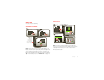
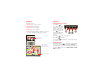
Assemble & charge
Note: This product uses a non-removable battery. The
battery should only be replaced by a Motorola-approved
service facility. Any attempt to remove or replace your
battery may damage the product and void your warranty.
Tip: To save battery life, see “Battery tips” on page 25.
2
microSD in.
3
Charge up.
3H
1
Micro SIM in.
Note: Pull
down the
access door
to insert the
micro SIM and
microSD cards.
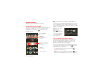
Set up & go
Note: Your phone supports data-intensive apps and
services. It is strongly recommended that you purchase
a data plan that meets your needs. Contact Verizon
Wireless® for details.
11:23
Arturo Roman
JP Jordan
Tatia Torrey
Kim Vonesh
MarketBrowserVoicemail Email
Phone AppsText Camera
P
Jordan
T
Bro
wse
C
amer
a
J
P
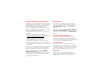
Turn on.
Tu
1
i
l
t
Create account,
or log in.
C
o
3
Set up your Google Account
Don’t have a Google Account?
Already have a Google Account?
Want to set up an account later?
Create
Sign in
Skip
T
a
t
h
tt
p
://www
.
Select a language.S
2
Welcome
Touch the android to begin.
Emergency dial Change language
Add accounts.
e
A
4
Set Up Accounts
If you use any of the services below, tap the
icon to set it up.
Visual Voice Mail
Email Accounts
MotoCast ID
Corporate Sync
Google
Backup Assistant+
Contacts