
User`s guide


26 Webtop application
Connect the webtop application
Connect your smartphone to the Motorola
Lapdock™ 100 to automatically launch the webtop
application.
Connect your smartphone to an HD display using the
HD Dock or Adapter for webtop application, then choose
the webtop application from the application menu.
When you’re done using the webtop application, just
disconnect your phone from the accessory.
Control the webtop application
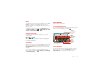
To navigate the webtop application display:
• In the Phone window, you can open your phone apps.
• At the bottom of the screen, you’ll see App
Shortcuts.
You can open multiple Firefox browsers.
• At the top right of the screen, you’ll see icons for
status and
Settings
.
For help in the webtop application, open
Settings
>
Help
at the top right of the screen.
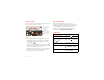
Send current web page to phone
When you find an interesting web page in the webtop
application, you can send it to your smartphone to view
after undocking. In the Firefox browser, select File
> Send to phone. If prompted to complete the action,
select Browser. The web page opens in your
smartphone browser.