
User`s guide



25Webtop application
Battery tips
Want to extend your battery life? Try these:
• Use the Smart Actions app to manage smartphone
settings and help minimize battery use. For more
information, touch >
Smart Actions
, then touch
Menu >
Help
.
• To turn off background data transfers, touch Menu
>
Settings
>
Data manager
>
Background data
.
• To turn off Bluetooth™ power, touch Menu
>
Settings
>
Wireless & networks
>
Bluetooth
.
• To turn off Wi-Fi power, touch Menu >
Settings
>
Wireless & networks
>
Wi-Fi
.
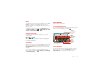
Webtop application
smart mobile computing
Quick start: Webtop
Browse, or use web apps, on a large screen in a full
Firefox™ browser. Create and share documents,
spreadsheets, and presentations with online tools like
Google Docs.
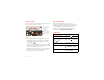
To open the webtop application, connect your
smartphone to an HD display or monitor using a dock
accessory (sold separately).
Account Manager
LapDock Display, HDTV, or Monitor
Mobile View
App Tr ay Full Desktop
Browser
Optional LapDock or HD Dock