
User`s guide







21Text entry
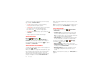
Email
The first time you turned on your smartphone (see “Set
up & go” on page 3), you probably logged in to your
Gmail™ account. You can add any other email account
that you set up.
To add other email accounts to your
Messages
widget
and
Universal Inbox
, touch >
My Accounts
>
Add
account
>
Email Accounts
.
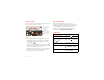
Instant messages
To send and receive instant messages, you can use
Google Talk™.
Find it: >
Talk
Tip: You can also download an instant messaging app
from Android Market™.
Voicemail
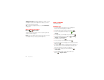
When you have a new voicemail, appears at the top
of the screen. Drag down the status bar and touch the
New voicemail
notification to listen to your voicemail
message.
If you need to change your voicemail number, in the
home screen touch Menu >
Settings
>
Call settings
>
Voicemail settings
.
Account Manager
Text entry
keys when you need them
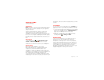
Touchscreen keypad
You can open a keypad on your screen by touching a text
box. To close the keypad, touch Back .
Input methods
To select an input method, touch and hold a text entry
area on the screen to open the
Edit text
menu. Touch
Input method
, then touch the method you want.
Dinner at Bistro Fanta
asdfghj kl
zxc
v
bnm
ertyuiopqw
21 09876543
.
Done
?123
Open a keypad for
numbers & symbols.
Voice Input/
Dictation
Delete
Shift
Space
Return/
New Line
Text Box
Touch to open
touchscreen
keypad.
Shift