
User`s guide



14 Calls
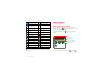
In-call options
To use a Bluetooth™ device, touch
Bluetooth
. (The
device must be turned on and previously paired—see
“Connect new devices” on page 44.)
Note: Using a mobile device or accessory while driving
may cause distraction and may be illegal. Always obey
the laws and drive safely.
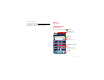
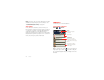
Mobile (555) 555-7931
Chicago, IL
Kristine Kelley
Bluetooth
Mute
Speaker
Add call End call Dialpad
Connected
00:12 Verizon Wireless
Call Timer
End Call
Hang up.
Speakerphone
Turn the speakerphone
on or off.
Dialpad
Enter numbers during a call.
Mute
Mute or unmute the call.
Tip: You can touch Home or Back to leave the
active call display. To reopen it, touch Home
>
Phone
.
Make & answer calls
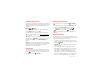
To make a call, touch
Phone
, enter a number, then
touch .
Tip: If the screen is locked, drag to the right first.
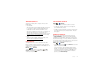
To answer a call when the screen is active, touch .
When the screen is locked, answer by dragging to
the right.
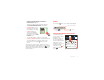
To ignore a call when the
screen is active,
touch . When the
screen is locked, ignore the
call by dragging to the
left. Your smartphone gives
you the option to send a
text message to the caller.
Select a message and
touch
Ok
to send it, or
touch
Cancel
to exit without
sending a message.
Tip: To silence an incoming
call alert, press Power or the volume keys.
Note: When you hold the smartphone to your ear, the
display goes dark to prevent accidental touches. When
Answer
Create new message
”Sorry I was unable to
answer your call”
”Please call me again
in a few minutes”
Turn off text message
reply
Ok Cancel
”I will call you back in
a few minutes”
Text Message Reply
Ignore