
User`s guide


10 Apps & updates
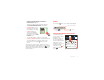
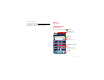
Tip: To see today’s date, touch the status bar at the top
of the screen.
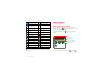
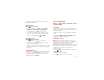
network (full signal) 3G (fast data)
network (roaming) 4G (fastest data)
network
(no connection)
GPS active
Wi-Fi in range Wi-Fi connected
Bluetooth™ on Bluetooth
connected
USB connected sync
downloading warning
active call missed call
airplane mode microSD card
new text message alarm set
new email calendar
new voicemail music
vibrate speakerphone on
sound off call mute
battery (charging) battery (full charge)
Apps & updates
get the app you want
Quick start: Apps & updates
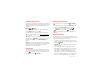
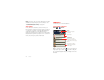
You can find all of your apps in one place. From the
home screen, touch to open the app menu. To see all
of your apps, flick left and right.
From the app menu, touch to view or create app
groups.
To close the app menu, touch Home or Back .
All apps
New group
All apps
All apps
Recent
Rece
nt
Downloaded
Download
ed
Verizon Wireless
rizon Wire
le
Open the app groups menu.
Choose which app group
you want to see.
Create a new app group.
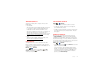
Find new apps
on Android Market™.