
Installation Instructions


Connect the black lead to a convenient solid chassis ground point. DO NOT connect the black lead
directly to the battery negative terminal.
Table 11: Power Cables
Description Part Number
Mid Power Dash Mount HKN4191_
Mid Power Remote Mount HKN4192_
O5, O7, and O9 Remote Control Head Power
Cable
HKN6188_
NOTICE: Remote Control Head power cable uses a 5 A Fuse (part number 6580283E03).
2.3.1
Optional Locking Feature for High-Power Chassis Power Cables
An optional clip (HLN7017_) can be used to increase DC cable retention in high-power radios.
Procedure:
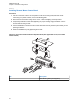
1 Insert the DC cable to the radio by aligning the male and female portions of the battery side with
the mating components on the radio side.
Figure 59: Inserting DC Cable to the Radio
2 Insert the locking bracket (HLN7017_) onto the DC cable.
3 Slide the bracket toward the radio until the bracket clips snap onto the radio features.
MN005720A01-AB
Chapter 2: Standard Configurations
63