
Installation Instructions






2.2.2.4
Setting the Initial Control Head ID
The Front Panel Programming (FPP) mode allows you to define which control head in a Multi-Control
Head system becomes control head number 1–4.
Prerequisites: Set the control head ID number for each attached head the first-time Multi-Control
Head is used.
Procedure:
1 Press the Power button to power off the radio.
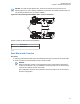
2 Simultaneously press and hold the left-most Soft Menu key and the Emergency button on the
control head.
Figure 52: APX Mobile O5 Control Head Front View
O5
3
2
1
No. Description
1 Power button
2 Left-most Soft Menu key
3 Emergency button
3 Press the Power button to power on the control head.
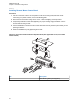
Figure 53: Radio Display with Current Control Head ID
The head is powered on into FPP mode and displays the current control head ID number.
4 Turn the Mode knob to change the control head ID number.
MN005720A01-AB
Chapter 2: Standard Configurations
58