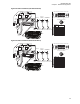
MN005720A01-AB Chapter 2: Standard Configurations Figure 35: Radio Installation (O5 Remote Mount) BATTERY (+) (-) FUSE PORTS ON REAR OF REMOTE CONTROL HEAD RED LEAD FUSE FUSE YELLOW BLOCK LEAD ANTENNA 1 FUSE HORN RELAY BLACK LEAD LIGHT RELAY SPEAKER ANTENNA 2 WI-FI (OPTIONAL) 3 ft ACC ANTENNA 3 GPS (OPTIONAL) PWR SPK CAN CAN 10 9 8 7 5 4 2 CONTROL HEAD MIC FIREWALL HOLE DC POWER CABLE USB VIP CONNECTOR PIN-OUT 3 ft MIC CLIP DEK VIP J400 6 J400 1 VIPCable Radio Function Pin
MN005720A01-AB Chapter 2: Standard Configurations Figure 37: Radio Installation (O7 Remote Mount) FUSE BATTERY (+) PORTS ON REAR OF REMOTE CONTROL HEAD RED LEAD FUSE (-) FUSE YELLOW BLOCK LEAD ANTENNA 1 FUSE HORN RELAY BLACK LEAD 3 ft LIGHT RELAY SPEAKER ANTENNA 2 WI-FI (OPTIONAL) ACC ANTENNA 3 GPS (OPTIONAL) PWR SPK CAN CAN VIP CONNECTOR PIN-OUT 3 ft 10 8 9 MIC FIREWALL HOLE DC POWER CABLE J400 4 2 MIC CLIP 6 7 5 CONTROL HEAD DEK VIP J400 1 VIPCable Radio Function Pin (HKN
MN005720A01-AB Chapter 2: Standard Configurations Figure 39: Radio Installation (O9 Remote Mount with Pinouts) J2 REAR ACCESSORY CONNECTOR 20 SPKR+ 26 7 13 SPKR- VIPOUT 2 12V (RELAY) IGN SENSE (ACC) VIPOUT 1 12V (RELAY) EMERGENCY 21 1 8 GROUND 14 1 VIP CONNECTOR PIN-OUT 2 10 9 8 7 5 4 2 3 6 J400 1 Radio VIP Cable Function Pin (HKN6196_) Number Wire Color J400-1 RED SWB + 4 5 6 No. Description 1 J500 USB 2 J100 M.A.
MN005720A01-AB Chapter 2: Standard Configurations Figure 40: Remote Control Head Pinouts 5 4 3 2 6 1 12 No. Description 1 J100 2 J200 3 J300L 4 J300R 5 J400 6 J500 7 USB 8 DEK VIP (YELLOW) 9 CAN (BLUE) 10 CAN (BLUE) 11 PWR SPK (RED) 12 M.A.
MICROPHONE SPEAKER A+ (RED) IGN SENSE (thin RED) FUSE SEE NOTE ACC line VEHICLE IGNITION SWITCH Ignition sense cable uses either 3-amp fuse (6580283E01) or 4-amp fuse (6580283E02) NOTE: See TABLE 2-1 for wiring of the thin RED wire. A good GROUND connection to the car chassis is required for correct radio opearaions.
GROMMET SPEAKER CONTROL HEAD (REAR VIEW) A+ (RED) IGN SENSE (YELLOW) MICROPHONE OPERATOR COMPARTMENT FUSE SEE NOTE ACC line VEHICLE IGNITION SWITCH NOTE: See TABLE 2-1 for wiring of the YELLOW wire. A good GROUND connection to the car chassis is required for correct radio operation.
URC Controller Box REAR CONNECTOR RADIO GCAI to RJ45 Cable Chassis GND (BLK) GROMMET CAN extension cable (BLK) IGN Sense (yellow) A+ (Red) 16A Circuit Breaker 15A, 20A OR 30A FUSE SPEAKER SEE NOTE A+ (Red) ON/ACC VEHICLE IGNITION SWITCH 3A OR 4A FUSE MICROPHONE 15A Fuse RADIO POWER CABLE (RED/BATTERY HOT) Control Head (Rear View) A+ (Red) OPERATOR COMPARTMENT GROMMET (-) VEHICLE BATTERY Chassis GND GROMMET (+) PART OF VEHICLE WIRING Siren Speaker VEHICLE BATTERY COMPARTMENT N
MN005720A01-AB Chapter 2: Standard Configurations 2.1.3 Radio Operation Wiring for Dash and Remote Configurations Determine the radio functionality you wish to achieve from the tables in Remote Mount: Power, Ignition, and Emergency Cable Installation on page 46, which is the vehicle ignition switch state is controlling, the physical wiring of the radio ignition sense (ACC) wire, and by the programmed CPS setting.
MN005720A01-AB Chapter 2: Standard Configurations emergency accessory is installed, the radio powers up incorrectly into emergency mode all the time. Refer to Figure 90: Emergency Jumper Removal in Remote Mount on page 88 for details. The design of the control head is different compared to the radio. Therefore it is also not necessary to attach HLN6863 to J100 to prevent accidental emergency operation.
MN005720A01-AB Chapter 2: Standard Configurations Mid Power Dash/ Remote High-Power Dash/ Remote Transceiver Red Power Wire HLN6863 Thin Red Wire at J2 HLN6863 Thin Red Wire at J626 Transceiver Red Power Wire Connected to ignition switch Ignition switch controls HLN6863 Thin Red Wire at J2 HLN6863 Thin Red Wire at J626 X No ignition switch control. Enables ignition switch functionality as programmed in the codeplug.
MN005720A01-AB Chapter 2: Standard Configurations Feature Description Required Soft Power-off Ignition Only Power-up • If IGNITION is not present, all transmissions are inhibited. • The radio is able to affiliate with trunking systems. The radio can ONLY receive trunking dispatch communications. • Emergency Alarm transmissions are possible with the use of the Emergency Power-up feature. • Radio POWERS ON when the Power button is pressed and Ignition is present.
MN005720A01-AB Chapter 2: Standard Configurations • For 130 W operation, parallel the two 11 Ω speakers, each rated at 65 W minimum. Proper phasing of the two speakers is important when connecting two speakers in parallel, wire similar speaker terminals together to ensure maximum loudness and prevent "deadspots". For example, if the terminals are marked "1" and "2", connect the terminals marked "1" together and connect those wires to one speaker lead.
MN005720A01-AB Chapter 2: Standard Configurations NOTICE: For optimum radio performance, orient the mounting trunnion as shown in the following figures. For new or existing installations of APX 2500, APX 4500, and APX 1500, use only the APX mobile trunnion, kit number HLN6861_. Figure 44: Enhanced Single Band Mobile Radio Trunnion Orientation 1 Applies to radios in dash and remote installations. No. Description 1 Radio Front 2.2.
MN005720A01-AB Chapter 2: Standard Configurations Figure 45: Transmission Hump Trunnion Mounting 3 1 1 Figure 46: Below Dash Trunnion Mounting 1 3 2 7 6 1 5 4 Table 8: Mid Power Trunnion Kit 52 Item Part Number Description Mid Power Radio 1 0305760W04 Trunnion Mounting Wing Screw Enhanced Single Band Mobile 2 0312002B14 Self-Drilling Tapping Screw Enhanced Single Band Mobile 3 HLN6861_ ASTRO Trunnion Hardware Kit Enhanced Single Band Mobile 4 - Threaded Hole for Screw - 5 - Gro
MN005720A01-AB Chapter 2: Standard Configurations Item Part Number Description Mid Power Radio 6 - Plastic Guides - 3 Using the trunnion mounting bracket as a template, mark the positions of the holes on the mounting surface. Use the innermost four holes for a curved mounting surface such as the transmission hump, and the four outermost holes for a flat surface such as under the dash. 4 Center punch the spots you have marked and realign the trunnion in position.
MN005720A01-AB Chapter 2: Standard Configurations 2.2.2.1.1 Installing Remote Mount Control Head Procedure: 1 Use the control unit trunnion as a template to mark the mounting holes; drill 5/32" holes. If mounting on a plastic surface, use a metal backing plate. 2 Attach the trunnion bracket using all four 10-16" x 5/8" self-tapping screws provided. 3 Temporarily install the control head (adjusting for proper viewing angle) and fasten it to the trunnion with two wing screws.
MN005720A01-AB Chapter 2: Standard Configurations Figure 48: O9 Control Head Installation Exploded View 1 6 5 2 4 3 No. Description 1 Adjust the control head to a desired angle and secure with wing screws 2 Mounting surface 3 IMPORTANT: If the trunnion is mounted on a plastic or unstable surface, use a metal backing plate (not supplied).
MN005720A01-AB Chapter 2: Standard Configurations Figure 49: O5 Control Head Rear View (Also applicable for O2 and O7 Control Heads) Figure 50: E5 Control Head Rear View Figure 51: O9 Control Head Rear View 56
MN005720A01-AB Chapter 2: Standard Configurations 2.2.2.2 Multiple Control Head Installation Install control heads in a multiple control head configuration as per the steps detailed in Installing Remote Mount Control Head on page 54. Two heads can be connected to each of the two CAN connectors on the radio, with the remaining heads connected to one or both of the first two. You can also connect control heads in a “daisy chain” configuration from the CAN connector of a single radio.
MN005720A01-AB Chapter 2: Standard Configurations 2.2.2.4 Setting the Initial Control Head ID The Front Panel Programming (FPP) mode allows you to define which control head in a Multi-Control Head system becomes control head number 1–4. Prerequisites: Set the control head ID number for each attached head the first-time Multi-Control Head is used. Procedure: 1 Press the Power button to power off the radio.
MN005720A01-AB Chapter 2: Standard Configurations Figure 54: APX Mobile O5 Control Head Front View – Mode Knob 1 O5 No. Description 1 Mode Knob 5 Repeat step 1 through step 4 to set the ID of the remaining control heads. NOTICE: In Multiple Control Head (MCH) installations, the yellow ignition sense wire must be connected to the head assigned ID #1. 2.2.2.
MN005720A01-AB Chapter 2: Standard Configurations Figure 55: O3 Control Head 1 2 3 No. Description 1 Top 2 Left 3 Front 4 Right 5 Back 4 5 The recommended mounting surface for the control unit is on the center console. Figure 57: Hang-Up Clip Installation Exploded View on page 61 shows how the hang-up clip control head, and cables should be installed for the O3 control head. A mounting clip, which allows the control head to be mounted, is supplied together with the control head.
MN005720A01-AB Chapter 2: Standard Configurations CAUTION: Shield the control head (front and back) from direct exposure to pressurized water. The pressurized water from a hose is usually more severe than the stated test and conditions in typical environments. Figure 56: O3 Control Head Rear View Figure 57: Hang-Up Clip Installation Exploded View 3 1 2 2 Item No.
MN005720A01-AB Chapter 2: Standard Configurations 2.2.3 Radio Locking The section describes the radio locking on the trunnion. 2.2.3.1 Locking Kit Enhanced Single Band Mobile Radio If an optional locking kit (HLN6372_) is used, position the lock housing on the trunnion after installing the radio mounting screws. Then rotate the lock with the key in it and remove the key to lock the radio. You can install the lock on either side of the radio, and in dash and remote mount installations.
MN005720A01-AB Chapter 2: Standard Configurations Connect the black lead to a convenient solid chassis ground point. DO NOT connect the black lead directly to the battery negative terminal. Table 11: Power Cables Description Part Number Mid Power Dash Mount HKN4191_ Mid Power Remote Mount HKN4192_ O5, O7, and O9 Remote Control Head Power Cable HKN6188_ NOTICE: Remote Control Head power cable uses a 5 A Fuse (part number 6580283E03). 2.3.