
TriStar MPPT 600V Installation & Operation Manual


55TriStar MPPT 600V Operator’s Manual
5.3 Serial RS-232
The serial port connection on the TriStar MPPT 600V is a standard 9-pin isolated RS-232 port.
Seegure3-5fortheportlocation.TheTriStarMPPT600Vcommunicatesthroughtheserialport
via the open standard MODBUS
TM
protocol.
Connect the TriStar MPPT 600V to the serial port on a PC to:
• program custom charge settings with MSView
TM
PC software
• view real-time data with MSView
TM
PC software
• log real-time data with MSView
TM
PC software
• congureethernetsettings
• updatecontrollerrmwarewithMSLoad
TM
rmwareutility
NOTE:
The RS-232 and EIA-485 ports share hardware. Both ports cannot be used simultaneously.
NOTE:
If your PC does not have a serial port, a USB to Serial cable can be purchased at your local
electronics retailer. Tripp-Lite brand compatibility has been veried.
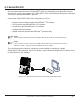
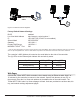
Theserialconnectionisidealforconguringcustomsettingsormonitoringasingle
TriStar MPPT 600V controller. Figure 5-2 shows a serial connection between the controller and a
PC with MSView
TM
PC software.
Serial Cable
Figure 5-2. A serial connection between a PC and the TriStar MPPT 600V