
Operating Instructions

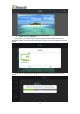


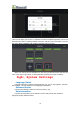


Table Of Contents
- 一、Software Introduction
- 二、Application Installation and Uninstallation
- 三、User Login
- 四,Device Control Management
- 五、Program Management
- 六、Media Types
- 七、Custom Templates
- 八、System Settings
- 九、Advanced Settings
- 十、FAQ&Solutions

(6)When the parameters of the position and size of this 3 windows are set, click
“save”in the upper right corner to complete the custom template operation, and it will
automatically return to adding template interface, and then you will be able to see the
the newly added 1600x960 multi window template,as shown below:
When you need to use the template for next time,just directly select and click the
“OK” in the upper right corner, to add media files respectively in this 3 windows.
Eight、System Settings
Language Switch
Ledmagic Application System Language Switch. For now it only supports “Chinese”
and “English”. Choose and Switch the Language Immediately.
Software Version
It shows the Ledmagic version info that currently in use.
Help Information
It shows the information of the software version and provide with technical
supports(company website,email).
18