
Operating Instructions

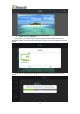


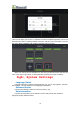


Table Of Contents
- 一、Software Introduction
- 二、Application Installation and Uninstallation
- 三、User Login
- 四,Device Control Management
- 五、Program Management
- 六、Media Types
- 七、Custom Templates
- 八、System Settings
- 九、Advanced Settings
- 十、FAQ&Solutions

(4)Slightly press the “00”which inside the 00 window frame with your finger,s
when the bottom edge of the box appears: edit,delete,move up,move down, click
“edit” to set the position and size of the 00 window, enter the X,Y, Width,Height of the
00 window, as shown below:
(5)Click the “+” on the left to add the window again, and the green 01 window
frame appears, and with the same operation once again to click “+” to add the window
02. Select window 01 and 02, with your finger slightly press the 01,02, click “edit” and
enter the X,Y,width and height in the popped up window,as shown below:
17