
Operating Instructions

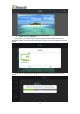


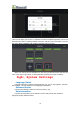


Table Of Contents
- 一、Software Introduction
- 二、Application Installation and Uninstallation
- 三、User Login
- 四,Device Control Management
- 五、Program Management
- 六、Media Types
- 七、Custom Templates
- 八、System Settings
- 九、Advanced Settings
- 十、FAQ&Solutions

1、Custom Design the Single Window Template
Here are the steps to add a single window template:
(1)Click “+” on the left to add a window, and a green frame 00 appears, as
shown below:
(2)In the 00 box,press your finger slightly on the edge of the frame and slide it
in the direction you want to drag. Slide your finger to drag the frame so that the green
frame is drawn to the widest and highest state, i.e.: fill 600x1000, as following figure
shows:
(3)Click “Save” in the upper right corner to complete the custom templates
operation, and it will automatically return to the add program interface,as shown
below:
15