
Operating Instructions

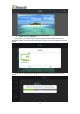


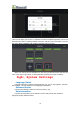


Table Of Contents
- 一、Software Introduction
- 二、Application Installation and Uninstallation
- 三、User Login
- 四,Device Control Management
- 五、Program Management
- 六、Media Types
- 七、Custom Templates
- 八、System Settings
- 九、Advanced Settings
- 十、FAQ&Solutions

publish from the album,as shown below:
Here we can set some requirements for the picture that will be displayed in the
program.
The picture is with “ Full Screen and Original Ratio” Types.
Switching Time(dwell time), the default is 1 hour, and the dwell time could be set
(hour,minute,second) according to the needs.
Special Effects, the special effects when switching files, the default is NONE, in
addition “ Fade in and out,random special effect, top to bottom, picture movement,
right to left, picture enlargement , picture rotation,picture zoomed out(reduction)”
are optional.
4、Program Saving
Click the “Save” Button in the upper right corner to return to the media adding
window, as shown below:
(if you want to continue adding pictures in the window , you can once more click
“+”to repeat the previous 2 steps to add in the pictures from the album.
Click the “<” button in the upper left corner to return to the program adding
window (the media file could be previewed from this displaying area),as shown
below:
11