
User guide




Monster® GO-DJ™ | Instruction Manual | Page 99
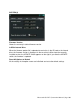
SYSTEM Tab
System (1)
Date/Time
Sets date and time.
USB Storage Mode
When this is set to the ON position, the GO-DJ enters into USB Storage Mode and
starts to wait for the USB connection to a computer.
Please note: All DJ and production-related functions are disabled when in the USB
Storage Mode.