
User guide




Monster® GO-DJ™ | Instruction Manual | Page 54
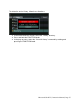
How to Clear All Playlists
You can delete all the playlists at the same time by following these directions:
● Select “Playlists” on the Media Selection Tab.
● Press and hold the FUNCTION knob, and a menu window will pops up.
● Select the “Clear all playlist” action by rotating and pressing the FUNCTION knob.
● Select “Yes” in the next confirmation window in order to delete all playlists and
their respective entries.