
User guide





Monster® GO-DJ™ | Instruction Manual | Page 101
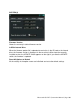
SYSTEM (3)
You can check the storage capacity and the size of free space of each storage medium.
If you slide the switch on the right side of a selected bar, you can format the storage.
However, in the following cases,
formatting is not available:
● While recording
● While playing music on either track
● While deleting or copying a file on either screen
When formatting, please note the following:
● If you format a storage medium, all data (including those not displayed on the
GO-DJ) are discarded.
● In the case of formatting an SD card, the volume label of the SD card is also
deleted.
Please note: The values and settings which are stored in the database such as BPM
and hot-cue points of each file are not cleared even after formatting storage media. You
can selectively delete these data from the reset menu in the file browser screen. If you
want to delete all the data in the database, use the firmware recovery menu.