
User Manual

Withus. Cdma UI.
2000. 10. - 7 - Make by Withus. Cdma Team
Correspondin
g Key
State Active
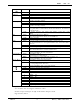
IDLE Used for SMS exclusively. SMS menu
(MSG_K)
Upon Korean Editing, this is used to select special character.
IDLE Display Main Menu.
CALL Select menu in busy state.
Menu(PF1_K)
MENU Move to the next menu. ( also press ‘#’ )
Operation according to Soft key.
IDLE Nonevent
CALL Memo during calls
OK(PF2_K)
MENU Used to choose corresponding menu and select and set each function.
Operation according to Soft key.
IDLE If pressing ‘Send ’ key after entering phone number, a call is made.
If no phone number, a call is made to the last dialed number in last call list. (if
no list, Nonevent)
Send
CALL If pressing ‘Send’ key after entering phone number, a call is made. (3- way
calling)
IDLE Press and hold the button for PWR On.
Press and hold the button in standby screen for PWR Off.
CALL Used to end a call.
End
MENU Unconditional return to the initial menu.
IDLE If pressing ‘CLR’ upon number input, number is erased one by one.
Pres and hold the button to erase inputted numbers all at one time and return to
idle mode.
CALL Busy muting function.
CLR
MENU Cancels corresponding menu and function and returns to the higher menu.
IDLE Upon Editing, input ‘*’.
Press and hold the button to set and clear manner mode.
* ( Star_K )
MENU Move backward from corresponding menu. (from #2 to #1…)
Upon Korean Editing, cursor moves backward.
IDLE Upon Editing, input ‘#’.
Press and hold to set Lock function.
# ( Pound_K )
MENU Move forward from corresponding menu. (from #2 to # 3…)
Upon Korean Editing, cursor moves forward.
IDLE Upon Editing, input corresponding number. HS_0 ~ HS_9
MENU If corresponding function resides in number key, activate it with selection key. (if
no corresponding function, Nonevent )
Upon Korean Editing, input corresponding character.
IDLE Activates it with key tone volume adjustment.
CALL Activates it with call volume adjustment.
MENU Up/down from the menu.
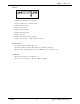
1 English : .
2 English : abc
3 English : def
4 English : ghi
5 English : jkl
6 English : mno
7 English : pqrs
8 English : tuv
9 English : wxyz
Figure button
0 English : oper
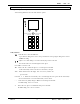
1.3 Display
- 128 * 128 LCD is used, and it supports 16 characters * 8 lines.
- All short messages are arranged to the right, and the number is arranged to the left.
- Supports Soft key method.