
User`s manual



7 - 1 7 - 1
MELSEC-Q
7 HOW TO READ INSTRUCTIONS
7 HOW TO READ INSTRUCTIONS
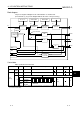
The following format will be used to explain to read instructions presented hereafter.
1)
2
)
3
)
4
)
5
)
1) Shows the item No. in the instruction summary.
2)
is added to devices that can be used the instruction.
The usage classifications for devices that can be used is shown below.
Internal devices
(System, user)
MELSECNET/H
direct J
\
Device
classifications
Bit Word
File register
Bit Word
Intelligent
function
module
U
\ G
Index
register
Z
Constant *1 Other *1
Usable
devices *3
X, Y, M,
L, SM, F,
B, SB,
FX, FY *2
T, ST, C,
D, W, SD,
SW, FD,
@
R, ZR
J
\X
J
\Y
J
\B
J
\SB
J
\W
J
\SW
U
\G Z
Decimal constant
Hexadecimal constant
Real number constant
Character string constant
P, I, J, U,
DX, DY,
N, BL, TR,
BL\S, V
*1: The devices that can be set are given in the Constant and others field.
*2: FX and FY can be used with only bit data and FD with only word data.
*3: For the explanation of each device, refer to the user's manual (function explanation, program fundamentals) of the used
CPU module.
7