
User`s manual



6 - 5 6 - 5
MELSEC-Q
6 INSTRUCTION LIST
6.2.3 Compensation operation instruction
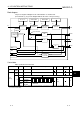
Table 6.4 Compensation Operation Instruction
Category
Instruction
Symbols
Symbol Processing Details
Number of
Basic Steps
See for
Descript
ion
S.FG
S.FG S1 D1 S2 D2
Outputs the value that follows
the polygon pattern whose input
data is specified.
7 10- 1
S.IFG
S.IFG S1 D1 S2 D2
Outputs the value that follows
the inverted polygon pattern
whose input data is specified.
8 10- 3
S.FLT
S.FLT
S1 D1
S2 D2
Outputs the average value of n
pieces of data sampled at the
specified data collection
intervals.
8 10- 5
S.SUM
S.SUM S1 D1 S2 D2
Integrates the input data and
outputs the result.
8 10- 8
S.TPC
S.TPC
S1 D1 S2 D2
Makes temperature/pressure
compensation to the input data
and outputs the result.
8 10-10
S.ENG
S.ENG S1 D1 S2 D2
Converts the input data into an
engineering value.
8 10-12
Compensa-
tion
operation
instruction
S.IENG
S.IENG S1 D1 S2 D2
Reversely converts the input
data from the engineering value
and outputs the result.
8 10-14
6.2.4 Arithmetic operation instruction
Table 6.5 Arithmetic Operation Instruction
Category
Instruction
Symbols
Symbol Processing Details
Number of
Basic Steps
See for
Descript
ion
S.ADD
S.ADD
S1 D1
S2 D2
Adds the input data with
coefficients.
8 11- 1
S.SUB
S.SUB S1 D1 S2 D2
Subtracts the input data with
coefficients.
8 11- 3
S.MUL
S.MUL
S1 D1
S2 D2
Multiplies the input data with
coefficients.
8 11- 5
S.DIV
S.DIV
S1 D1
S2 D2
Divides the input data with
coefficients.
8 11- 7
S.SQR
S.SQR S1 D1 S2 D2
Outputs the extraction ( ) of
the input data.
8 11- 9
Arithmetic
operation
instruction
S.ABS
S.ABS
S1 D1 S2 D2
Outputs the absolute value of the
input data.
8 11-11