
Specifications



900
FDC-HKX
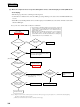
(ii) When the compressor does not operate although the remote controller display is normal (Without the
check display)
Take following steps first before confirming the following items:
• Confirm that it is normal at the indoor unit side, LED1 (green) keeps flashing on the outdoor unit control PCB and LED2 (red)
is not lit.
• When LED1 (red) is flashing while the remote controller display is normal, LED2 (red) can be turned off if SW
3-1 is turned ON
and turned OFF again.
Note (1) Be sure to turn the SW
3-5 off after the confirmation.
Notes (1) Expansion valve of the indoor unit may be closed or the indoor fan may be stopped. Stop the compressor no sooner than it has started. Neglecting
this caution could result in compressor trouble.
(2) Method to check with the outdoor unit only is described on the next page.
Turn on SW
3-5
(test run) on the outdoor
contorol PCB.
(Refer to page 888)
NO
NO
NO
YES
YES
NO
YES
YES
YES
YES
NO
NO
Is 52C turned ON? Replace 52C.
Does compressor
(1)
operate?
Does LED1 (green) on
inverter PCB flash?
Do 7 SEG on out-
door unit PCB indicate
20Hz or higher?
NO
YES
Does LED2 (red) on
inverter PCB light
or flash?
Is voltage detected
between U,V,W on
power transistor?
Defective inverter
Defective compressor
Note(1) Set 7 SEG indicator changeover
swich (SW
4
) to 0.
Defective inverter
Is voltage detected on
52C coil?
Outdoor unit control
PCB is defective.
• Is indoor return air thermistor normal?
• Is thermostat stopped?
Check error display again.
(See page 903.)
Diagnose errors on
LED's on inverter
PCB.
It is designed to transmit the highest request frequency from the
outdoor to the indoor regardless the state of thermostat. It will not
operate therefore if the transmission is not normal between the
outdoor and the indoor.
When it is turned on with SW
3-5
(test run), there is no error display
unless the indoor unit is connected. In such occasion, operate the
system with the remote controller and check if E3 (no counterpart)
or E5 (transmission error) is transmitted or not.
•
•
1
(From next page)