
User manual

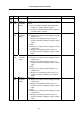


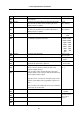


Table Of Contents
- Cover
- Introduction
- Precautions for Safety
- CONTENTS
- 1. Parameter Screens
- 2. Machining Parameters
- 3. I/O Parameters
- 4. Setup Parameters
- 5. Base Specifications Parameters
- 6. Axis Specifications Parameters
- 7. Servo Parameters
- 8. Spindle Parameters
- 9. Machine Error Compensation
- 10. PLC Constants
- 11. Macro List
- 12. Position Switch
- 13. Indexing Axis Parameters
- 14. Indexing Axis Position Switch
- 15. Indexing Axis Commands
- 16. Auxiliary Axis Parameters
- Revision History
- Back cover

5. Base Specifications Parameters
61
# Items Details
Setting range (unit)
1929
(PR)
Port number Set the HMI connection port No.
(Set the default value 64758 unless particularly required.)
0 to 65535
1930
(PR)
Speed 10M/auto Set the communication rate.
0: Fixed to “10Mbyte”
1: Recognized whether “10Mbyte” or “100Mbyte”
automatically and set.
0/1
1931
(PR)
IP address(2) Set NC's IP address.
Set for the card mounted on the 2nd channel when
2-channel connection is used on the Ethernet
communication. (Note1)
1932
(PR)
Subnet mask(2) Set sub-net mask.
Set for the card mounted on the 2nd channel when
2-channel connection is used on the Ethernet
communication. (Note1)
Set these according to
connection environ-
ment's network
regulations.
1933
(PR)
Port number(2) Set the HMI connection port No.
(Set the default value 64758 unless particularly required.)
Set for the card mounted on the 2nd channel when
2-channel connection is used on the Ethernet
communication. (Note1)
0 to 65535
1934
(PR)
Speed(2) 10M/auto Set the communication rate.
0: Fixed to “10Mbyte”
1: Recognized “10Mbyte” or “100Mbyte”
automatically and set.
Set for the card mounted on the 2nd channel when
2-channel connection is used on the Ethernet
communication. (Note1)
0/1
(Note1) When two Ethernet cards are mounted, make sure not to use IP address on the same network
IDs.
The cards are regarded as “same network IDs” when the area masked (validated) by “Subnet
mask” parameter is the same as another.