
User manual


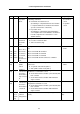
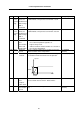

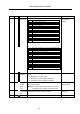
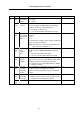
Table Of Contents
- Cover
- Introduction
- Precautions for Safety
- CONTENTS
- 1. Parameter Screens
- 2. Machining Parameters
- 3. I/O Parameters
- 4. Setup Parameters
- 5. Base Specifications Parameters
- 6. Axis Specifications Parameters
- 7. Servo Parameters
- 8. Spindle Parameters
- 9. Machine Error Compensation
- 10. PLC Constants
- 11. Macro List
- 12. Position Switch
- 13. Indexing Axis Parameters
- 14. Indexing Axis Position Switch
- 15. Indexing Axis Commands
- 16. Auxiliary Axis Parameters
- Revision History
- Back cover

5. Base Specifications Parameters
43
# Items Details
Setting range (unit)
1218 aux02
(bit3)
Parameter
input/output
format
Specify a parameter input/output format.
0: Type I
1: Type II
0/1
aux02
(bit4)
Tool number
selection
Specify the R register that contains the tool number
used for automatic calculation when measuring the
coordinate offset of an external work piece.
0: Conforms to "#1130 set_t".
1: Uses the tool number indicated by user PLC
0/1
aux02
(bit5)
Parameter
I/O II spindle
specification
address
Specify the spindle specification address of parameter
I/O type II.
0: C
1: T
This parameter also applies to the spindle specification
address for input and collation.
(Note) This parameter is valid only for parameter I/O
type II ("#1218 aux02/bit 3" is 1).
0/1
aux02
(bit6)
Set No. valid
when
program
input
Specify which program No. is selected when inputting
operation using “#1 MAIN PROGRAM” in Data I/O
screen.
0: The No. in the input data is valid.
1: The No. set in the data setting area is valid.
0/1
aux02
(bit7)
Input by
program
overwrite
When inputting the machining program in the "Data
input" screen, select one of the following options when
the input program has already been registered:
0: Outputs error message "E65 PROG. No. DUPLI"
1: Input by overwrite
0/1
1219 aux03
(bit1)
Stop high-
speed PC
monitoring
function
Set 1 to disable the function that stops the system when
the high-speed processing time is extended.
Disable the monitoring function only as a temporary
measure.
0/1
aux03
(bit2)
Improve skip
coordinate
accuracy
0: Skip accuracy (conventional specification)
1: Changes skip accuracy (correct a position in skip
coordinates when entering skip signals).
0/1
aux03
(bit3)
Reserved for the system. 0