
User manual

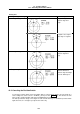



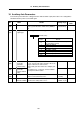


Table Of Contents
- Cover
- Introduction
- Precautions for Safety
- CONTENTS
- 1. Parameter Screens
- 2. Machining Parameters
- 3. I/O Parameters
- 4. Setup Parameters
- 5. Base Specifications Parameters
- 6. Axis Specifications Parameters
- 7. Servo Parameters
- 8. Spindle Parameters
- 9. Machine Error Compensation
- 10. PLC Constants
- 11. Macro List
- 12. Position Switch
- 13. Indexing Axis Parameters
- 14. Indexing Axis Position Switch
- 15. Indexing Axis Commands
- 16. Auxiliary Axis Parameters
- Revision History
- Back cover

12. Position Switch
12.2 Canceling the Position Switch
286
Rotary axis
Setting of dog1 and dog2 Operation Description
dog1 < dog2
A signal is output
between dog1 and
dog2.
A signal is also output
when dog1 is negative.
dog1 > dog2
A signal is output
between dog2 and
dog1.
⏐dog1 − dog2⏐ ≥ 360
A signal is kept output
when the difference
between dog1 and dog2
exceeds 360 degrees.
12.2 Canceling the Position Switch
To cancel the position switch‚ enter the number (#75∗1) of the position switch to be canceled in # ( )
of the setting area‚ enter a slash "/" in DATA ( )‚ then press the INPUT key. This deletes the axis
name for the specified position switch‚ thus invalidating the position switch.
The data specified for <dog1> and <dog2> are still stored in memory. To validate the position switch
again‚ therefore‚ it is enough to specify the axis name only.