
Instruction manual




RCP-BR: Guide to Installation and Operation
Miranda Technologies Inc. Page 61
4.3 Setup
The web interface Setup option allows the setup of the following features:
• Network
• Hostname
• Time
• Mouse
• Serial number
• Station
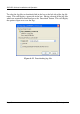
To select the Setup option point the mouse at the ‘Setup’ box. This will drop
down the Setup list as shown in figure 4-15.
Figure 4-15 Web interface setup selection
Move the mouse cursor down over the list of setup options and left click to select
the required option.