
User Manual

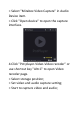
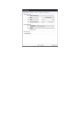

> Select "Mirabox Video Capture" in Audio
Device item.
> Click "Open device" to open the capture
interface.
4.Click "Pot player-Video-Video recoder" or
use shortcut key "Alt+C" to open Video
recoder page.
> Select storage position;
> Set video and audio capture setting;
> Start to capture video and audio;