
User manual


Table Of Contents
- Getting to know your Mio
- Using your Mio in a vehicle
- Operating basics
- Mio Connect (select models only)
- Bluetooth connectivity (Moov 330/360 only)
- Using Bluetooth Hands-Free Calling (Moov 360 only)
- MioMore Desktop
- Reference
- Regulatory information
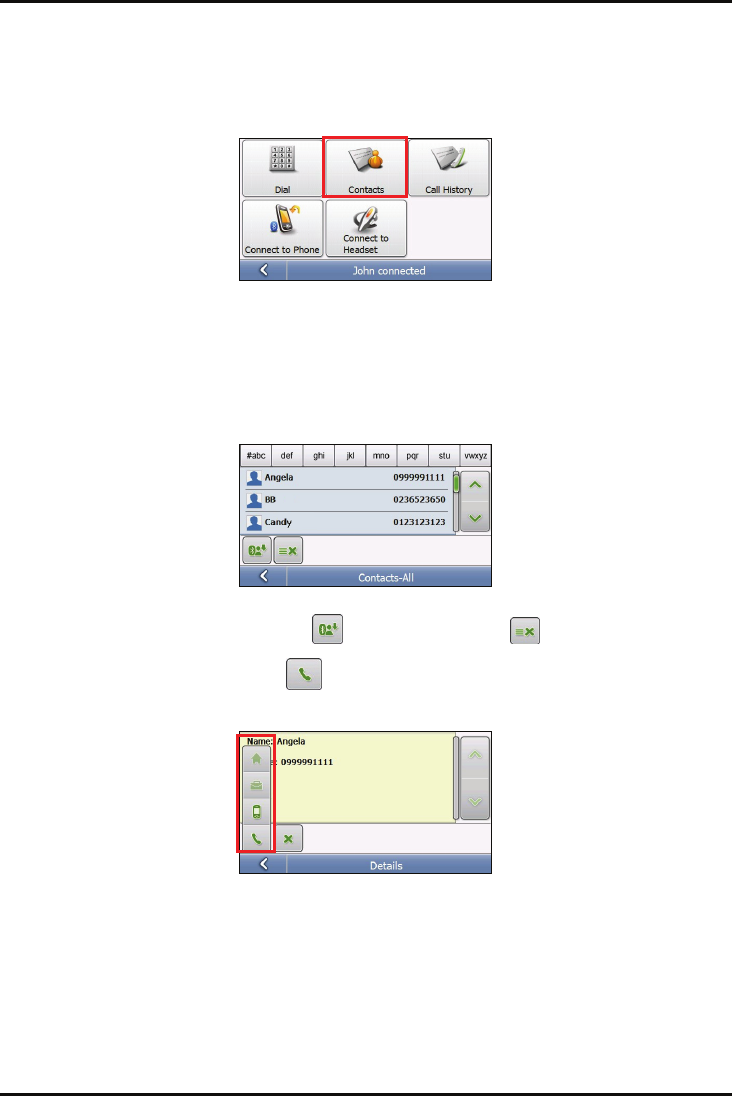
Placing a call using the phonebook
1. After your Mio is connected to a mobile phone, tap Phone on the Main Menu.
2. Tap Contacts.
3. If the phonebook has not yet been downloaded, a message appears on the screen. Tap Yes to download
the phonebook from your phone.
Note: Not all mobile phone models support the downloading of such data.
4. The contact list appears on the screen. Scroll through the list to locate the contact or tap the index for
faster search. Tap the name of the contact you want to call.
Note: If you need to refresh the contact list, tap . To clear the contact list, tap .
5. The details of the contact display. Tap to expand the other buttons and tap a corresponding button
to call the home, work, or mobile phone.
16