
Operating Instructions and Installation Instructions

EN 10 millheat.com
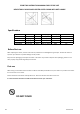
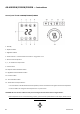
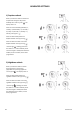
1) Dayme setback
When you want the heater to reduce the
temperature during the day (set for
weekdays from now on) press . . The
display shows "d".
Enter the correct weekday. (Monday = 1,
Tuesday = 2, Wednesday = 3, Thursday =
4, Friday = 5, Saturday = 6, Sunday = 7).
Save by pressing this: .
Enter the desired temperature for
dayme setback. Save by pressing .
Enter the desired number of hours for
dayme setback. Save by pressing .
*Control light is steady green when
the heater is in an acve setback period.
The control light is steady white when the
setback period is inacve, but has been
programmed.
ADVANCED SETTINGS
2) Nighme setback
When you want the heater to reduce
the temperature in the evening
(applicable every evening/night from
now on) press . The display shows °C.
Enter the desired temperature for
nighme setback. Save by pressing .
Enter the desired number of hours for
nighme setback. Save by pressing .
*Control light is steady green when
the heater is in an acve setback period.
The control light is steady white when
the setback period is inacve, but has
been programmed.