
User's Manual





Chapter Four - 3
5
BIOS Setu
p
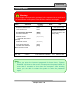
Security Menu
Phoenix SecureCore (tm) Setup Utility
Main Advanced Security Boot Exit
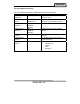
Item Specific Help
Supervisor Password Is: Clear
User Password Is: Clear
Set Supervisor Password [Enter]
Set User Password [Enter]
Diskette access: [Supervisor]
Fixed disk boot sector:
[Normal]
Password on boot: [Disabled]
AC97 Audio Interface: [Auto]
Cardbus/1394 Interface [Auto]
►RF Interface Control
Supervisor Password
controls access to the
setup utility.
F1 Help ↑↓ Select Item –/+ Change Values F9 Setup Defaults
Esc Exit ↔ Menu Enter Select ► Sub-Menu F10 Save and Exit
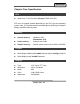
Warning
If you forget user/supervisor password, the computer has to send back
to manufacturer and replace Flash ROM to make it work again.
Note:
¾ Once you enter the incorrect password for three times, “System
Disabled” will show on the screen. Please press the power switch for
more than 5 seconds to shut down the computer. After shutting
down, you are able to restart the system to enter the password
a
g
ain
,