
User's Manual





Chapter Four - 31
BIOS Setu
p
Advanced Menu Selections
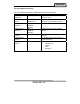
You can make the following selections on the Advanced Menu.
Feature Options Description
Boot-time
Diagnostic Screen
Enable
Disabled
Display the diagnostic screen during
boot
QuickBoot Mode Enable
Disabled
Allows the system to skip certain tests
while booting. This will decrease the time
needed to boot the system.
IGD - Boot Type VBT Default
CRT
LFP
CRT+LFP
EFP
CRT+EFP
Select the Video Device that will be
activated during POST
PS/2 Mouse Auto Detect
Disabled
Enabled
“Disabled” prevents any installed PS/2
mouse from functioning, but frees up IRQ
12. “Enabled” forces the PS/2 mouse
port to be enabled regardless if a mouse
is present. “Auto Detect” will enable the
PS/2 mouse only if present. “OS
Controlled” only displayed if the OS
controls the mouse.
PCI Express Port
#1
Enabled
Auto
Disabled
Disabled – Port always disabled. (If Port
#1 is disabled), then the rest
of the Ports will also be
disabled.)
Enabled – Port always enabled.
Auto – Only enable if card found.
Device 29 USB
2.0 Enable
Enable
Disabled
Enables Device 29 USB 2.0 functionality.
Passive Cooling
Trip Point
15 C/23 C/31 C/39 C/
47 C/55 C/63 C/71 C/
79 C/87 C/95 C/103 C/
109 C/111C
Disabled
This value controls the temperature of
the ACPI Passive Trip Point – the point in
which the OS will begin throttling the
CPU.
Note: When the DTS is enabled, only
values below 97C are valid.
Core
Multi-Processing
Enable
Disabled
Determines whether the 2nd core is
enabled.
Disabled = 2nd core is disabled.
Enabled = 2nd core is enabled.