
User's Manual




Chapter Four - 29
BIOS Setu
p
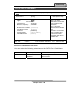
SATA Port 2 Sub-Menu
Phoenix SecureCore (tm) Setup Utility
Main
SATA Port 2 [Auto]
Item Specific Help
Type: [Auto]
Multi-Sector Transfers: [Disabled]
LBA Mode Control: [Disabled]
32 Bit I/O: [Disabled]
Transfer Mode: [Standard ]
Ultra DMA Mode: [Mode 5]
SMART Monitoring: Disabled
User = you enter
parameters of hard-disk
drive installed at this
connection.
Auto = autotypes
hard-disk drive installed
here.
CD-ROM = a CD-ROM
drive is installed here.
ATAPI Removable =
removable disk drive is
installed here.
F1 Help ↑↓ Select Item –/+ Change Values F9 Setup Defaults
Esc
Exit ↔ Menu Enter Select ► Sub-Menu F10 Save and Exit
SATA Port 2 Sub-Menu Selections
You can make the following selections on the SATA Port 2 Sub-Menu.
Feature Options Description
32 Bit I/O Enabled
Disabled
This setting enables or disables 32 bit
IDE data transfers.