
User Manual
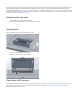
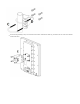




Table Of Contents

Attach the swivel adjuster to the mounting bracket. Use the long bolt in the position (F). Put one regular washer, and one spring washer onto the
shorter screws, then put them in positions (G). Do not tighten too much, as you need to adjust the antenna now.
Once antenna level and angle are adjusted according to the wireless signal in software, tighten all nuts. Note the degrees of angle for future
reference.
Grounding
Reset button
The reset button has three functions:
Hold this button during boot time until LED light starts flashing, release the button to reset RouterOS configuration (total 5 seconds).
Keep holding for 5 more seconds, LED turns solid, release now to turn on CAP mode. The device will now look for a CAPsMAN server (total 10
seconds).
Wind load
16 kg @ 40m/s, 9kg @ 30 m/s;
The installation infrastructure (towers and masts), as well as the router itself, must be properly grounded. The device includes a grounding wire
attachment screw on the backside of the unit. Attach your grounding wire to the grounding screw, then attach the other end of the grounding
wire to the grounded mast, please see the picture: