
User Manual
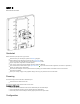
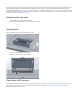
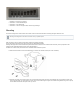
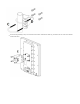




Table Of Contents

1.
2.
3.
4.
Solid Blue – The device is powered on.
Solid Green – Connected Ethernet port.
Solid Green – User-defined LED.
Solid Green – The set of five green LEDs, shows the signal strength.
Mounting
The device is designed to be used outdoors and mounted on the mast with all needed cables connecting through the latch of the unit.
When mounting on the mast, please ensure that the cable feed is pointing downwards.
The IP rating scale of this device is IP54. We recommend using Cat5/6 shielded cables.
Warning! This equipment should be installed and operated with a minimum distance of 30 cm between the device and your body. Operation of this
equipment in the residential environment could cause radio interference.
The QRT box contains several parts that need to be assembled. Please follow this process:
Attach the two brackets (A) to the swivel adjuster (B), by using the four provided screws (use a PH1 screwdriver).
Place the two U-bolts (C) around the mast or pole, and guide them through the holes on the swivel adjuster (D). Then, tighten the U-bolts, each
with one regular washer, one spring washer, and one nut, as shown in the image to the right. All nuts need to be tightened using a size 10 (3/8 in)
wrench. Maximum diameter of the pole can be up to 70 mm.
Mounting and configuration of this device should be done by a qualified person.