
User Manual
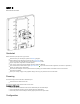
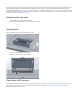
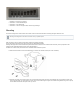




Table Of Contents

We recommend clicking the "Check for updates" button and updating your RouterOS software to the latest version to ensure the best performance and
stability. RouterOS includes many configuration options in addition to what is described in this document. We suggest starting here to get yourself
accustomed to the possibilities: . In case IP connection is not available, the Winbox tool ( ) can be used to connect to https://mt.lv/help https://mt.lv/winbox
the MAC address of the device from the LAN side (all access is blocked from the internet port by default). For recovery purposes, it is possible to boot the
device from a network, see the section Reset button.
Extension slots and ports
Gigabit Ethernet port, passive PoE on Ethernet port.
5 GHz wireless, supported protocol 802.11a/n, antenna gain 24 (dBi).
Opening latch
To access the Ethernet port and reset button, please open latch:
Pull the latch out downwards from the device.
Lift the latch, but do not remove them completely.
Front status LED behavior
RouterOS allows configuring each LED's activity the way that the user wishes. It is possible to configure the LEDs to display wireless strength, blink the
LEDs on interface traffic activity, and many other options. For further information please visit https://wiki.mikrotik.com/wiki/Manual:System/LEDS
Default factory configuration for this device: