
Kid MPPT Charge Controller Menu Map - Rev 1797

www.midnitesolar.com
17722 - 67th Ave NE, Arlington, WA 98223
PH 360-403-7207 FAX 360-691-6862
SETUP
Displays the adjustable parameters of
the specic function selected.
SAVE
Saves all the modied functions and
parameters.
ENTER
Enters the selected menu item.
STATUS
Displays the current Status of the Kid.
Press once to go back to the previous
status screen, press twice to go to main
status.
MENU/BACK
When pressed from Status Menu, it will
go to Main Menu. If inside a menu it is
used to go back one menu.
UP, DOWN, LEFT & RIGHT ARROWS
Used to navigate the menus, select and
modify the functions.
Symbolizes the SETUP button being
pushed.
S
SAVESETUP
MENU
BACK
STATUS
ENTER
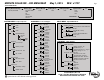
KID NAVIGATION PANEL
S
MISC MENU -
Other Stu
LCD
LCD Power Mode
ECO
ADJUST UP/DOWN
BKLITE
CONTRAST
NORMAL
STATUS SCROLL? - ENABLE/DISABLE
TEMP
CPU - C
FET - C
BATT
LEDS - LED MODE
NRML
BCM
RICK
PLAY
TEST
OFF
TIMER:
TIME - 00:00:00
PASSWORD
PASSWORD ENABLE - NO/YES
COMM MENU - Multiple Units
Communicate Mode
Twin - KID Search
Sync
PC - KID PC Mode
TECH MENU - Advanced Menu
Calibration
Battery V OFFSET - Volts
Input V OFFSET - Volts
AntiClick Sensit
EndAmp Shunt Sel UP/DOWN - KID/WBJR
Pre Matching
Min Low Power
NightLight on PV - Prole #
NightLight VOC%
Factory Reset
Press and Hold Left and Right
Updates Firmware
BOOTLOADER xx FIRMWARE UPDATE
About Kid CC
BOOTLOADER xx FIRMWARE xxxx
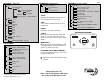
STATUS MENU
Screen 1
Battery Output Current
Bulk MPPT - State Of Charger
Battery Voltage
Charger Mode (Solar)
Wattage Into Battery
Screen 2
Input - PV Array Voltage
Battery - Battery Voltage
Screen 3
WBJR Amps
Shunt
Screen 4
Load: Function
Screen 5
KWhr
Ahr
Pushing the right/left arrow button will cycle
through the Status Menu screens.
Pg 2