User's Guide
Manuals
Brands
Microsoft Manuals
Cell Phones
GSM Cellular Phone
1
2
3
4
5
6
7
8
9
10
Table Of Contents
Contents
Safety
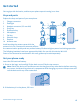
Get started
Keys and parts
Get your phone ready
Charge the battery
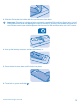
Lock the keys
Basics
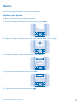
Explore your phone
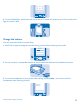
Change the volume
Change the ringtone
Write text
Use predictive text
People & messaging
Make or answer a call
Save a name and phone number
Save numbers in 5 separate phonebooks
Send and receive messages
Entertainment
Listen to the radio
Office
Set an alarm
After-sales policy
Product and safety information
Network services and costs
Emergency calls
Take care of your device
Battery and charger info
Battery and charger safety
Additional safety information
Small children
Medical devices
Implanted medical devices
Accessibility solutions
Hearing
Nickel
Vehicles
Potentially explosive environments
Certification information (SAR)
Nokia Care
Copyrights and other notices
Tip:
You can set yo
ur phone to ask f
or the lock co
de that you define. The default lock code is
12345.
© 2013 Nokia. All rights reserved.
7
1
...
...
5
6
7
8
9
...
...
22