User Guide Issue draft 2013-08-02 EN
User Guide Nokia XXX Contents Safety 3 Get started 4 Keys and parts 4 Get your phone ready 4 Charge the battery 6 Lock the keys 6 Basics 8 Explore your phone 8 Change the volume 9 Change the ringtone 10 Write text 10 Use predictive text 11 People & messaging 12 Make or answer a call 12 Save a name and phone number 12 Save numbers in 5 separate phonebooks 13 Send and receive messages 13 Entertainment 15 Listen to the radio 15 Office 16 Set an alarm 16 After-sales po
Safety We invite you to read the instructions on this guide before using the device. SWITCH OFF IN RESTRICTED AREAS Switch the device off when mobile phone use is not allowed or when it may cause interference or danger, for example, in aircraft, in hospitals or near medical equipment, fuel, chemicals, or blasting areas. Obey all instructions in restricted areas. ROAD SAFETY COMES FIRST Obey all local laws. Always keep your hands free to operate the vehicle while driving.
Get started Get to grips with the basics, and have your phone up and running in no time. Keys and parts Explore the keys and parts of your new phone. 1 2 3 4 5 6 7 8 9 10 Charger connector Flashlight Headset connector (3.5 mm AHJ) Scroll key End/Power key Microphone Call key Selection keys Earpiece Antenna area Avoid touching the antenna area while the antenna is in use. Contact with antennas affects the communication quality and may reduce battery life due to higher power level during operation.
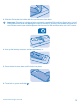
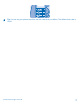
3. Slide the SIM under the holder with the contact area face down. Important: This device is designed to be used with a standard SIM card (see figure) only. Use of incompatible SIM cards may damage the card or the device, and may corrupt data stored on the card. Please consult your mobile operator for the use of a SIM card that has a mini-UICC cutout. 4. Line up the battery contacts, and put the battery in. 5. Press the back cover down until it locks into place. 6.
Charge the battery Your battery has been partially charged at the factory, but you may need to recharge it before you can use your phone. 1. Plug the charger into a wall outlet. 2. Connect the charger to the phone. When done, unplug the charger from the phone, then from the wall outlet. If the battery is completely discharged, it may take several minutes before the charging indicator is displayed or before any calls can be made. Lock the keys Lock the keys when not using your phone.
Tip: You can set your phone to ask for the lock code that you define. The default lock code is 12345. © 2013 Nokia. All rights reserved.
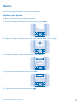
Basics Learn how to get the most out of your new phone. Explore your phone Explore your phone with a simple key press. 1. To see the apps and features of your phone, press Menu. Menu 2. To go to an app or feature, press the scroll key up, down, left, or right. 3. To open the app or select the feature, press Select. Select 4. To go back to the previous view, press Back. Back 5. To go back to the home screen, press © 2013 Nokia. All rights reserved. .
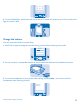
6. To use the flashlight, press the scroll key up twice. To switch off, press up once. Do not shine the light in anyone’s eyes. Menu Change the volume You can control the audio in several ways. 1. Scroll left or right to change the volume during a call or when listening to the radio. Volume 2. You can connect a compatible headset or other compatible device to the headset connector. 3. To use the loudspeaker on your phone when calling, select Loudsp..
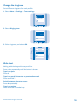
Change the ringtone Set a different ringtone for each profile. 1. Select Menu > Settings > Tone settings. Settings Tone settings Display settings Select 2. Select Ringing tone. Tone settings Ringing tone Nokia Tune Ringing volume Select 3. Pick a ringtone, and select OK. Airy Ringing tone Beach Bold Brook OK Write text Writing with the keypad is easy and fun. Press a key repeatedly until the letter is shown. Type in a space Press 0.
Use predictive text To speed up your writing, your phone can guess what you are starting to write. Predictive text is based on a built-in dictionary. This feature is not available for all languages. 1. Select Opt. > Dictionary and the language. 2. Start writing a word. When the word you want is shown, press 0. Change a word Press * repeatedly until the word you want is shown. Add a new word to the dictionary If the word you want isn't in the dictionary, write the word, select Spell, and type in the word.
People & messaging Contact your friends and family, and share files, such as photos, using your phone. Make or answer a call Read on and learn how to make or answer a call with your new phone. 1. Type in the phone number. To type in the + character, used for international calls, press * twice. 12 3456789 2. Press to make the call. To end the call, press . Calling 123456789 3. When someone calls you, press to answer.
2. Select Add contact and where you want to save the contact. Names Search Add contact Select 3. Write the name, and press OK, then type in the number, and press OK. Contact name: Jim Brown OK Save numbers in 5 separate phonebooks To use separate phonebooks, save contacts in the phone memory. To take multi-phonebook into use, select Menu > Contacts > Settings > Multi-Phonebook > Phonebook style > Multi-Phonebook. 1.
You can send text messages that are longer than the character limit for a single message. Longer messages are sent as two or more messages. Your service provider may charge accordingly. Characters with accents, other marks, or some language options, take more space, and limit the number of characters that can be sent in a single message. © 2013 Nokia. All rights reserved.
Entertainment Having a spare moment and in need of entertainment? Learn how to listen to the radio on your phone. Listen to the radio Use your phone to listen to the radio. 1. Connect a headset, and select Menu > Radio. The headset cable works as a radio antenna. 2. To go to the next channel, press down. 4. 100.00 MHz 99.0 101 3. To close the radio, select Options > Switch off. Switch off Manual tuning Save channel Auto tuning Select © 2013 Nokia. All rights reserved.
Office Learn how to use the calendar to keep yourself organised. Set an alarm Use your phone as an alarm clock. 1. Select Menu > Clock > Set alarms. Alarm clock Set alarms Alarm tone Standard Select 2. Select an alarm. Set alarms Alarm1 Off Alarm2 Off Select Tip: You can set up to five different alarms. 3. To set the hour, press up or down. To set the minutes, press right and then up or down. Press OK. 08 :00 © 2013 Nokia. All rights reserved.
After-sales policy Need assistance after you've bought your phone? Contact the store where you bought it for help and advice. Keep your receipt as proof of purchase for warranty purposes. © 2013 Nokia. All rights reserved.
Product and safety information Network services and costs You can only use your RM-963 device on the (E)GSM 850, 1900 MHz networks. You need a subscription with a service provider. You may also need to subscribe to some features. Emergency calls 1. Make sure the device is switched on. 2. Check for adequate signal strength. You may also need to do the following: • • • Put a SIM card in the device, if supported by your device.
When you cooperate and deliver all these materials to one of the available collection sites, you contribute in helping the environment and help to ensure the health of future generations. All electrical and electronic products and batteries may contain recycleable metals and other potentially hazardous substances and must be taken to their respective collection sites at the end of their working life. Under no circumstances should you break open a battery or other related materials.
• • • • Not carry the wireless device in a breast pocket. Hold the wireless device to the ear opposite the medical device. Switch the wireless device off if there is any reason to suspect that interference is taking place. Follow the manufacturer directions for the implanted medical device. If you have any questions about using your wireless device with an implanted medical device, consult your health care provider.
When operated at a separation distance of 1.5 centimetres (5/8 inch) from the body 0.46 W/kg over 10g GSM 850 Your mobile device is also designed to meet Federal Communications Commission (FCC) and Industry Canada SAR requirements. The limit is 1.6W/kg averaged over 1 gram of tissue. The maximum SAR values are: Maximum SAR value Frequency bands used when Maximum SAR value was recorded When held against the head 1.07 W/kg over 1g GSM 1900 When operated at a separation distance of 1.
Nokia does not provide a warranty for or take any responsibility for the functionality, content, or end-user support of third-party apps provided with your device. By using an app, you acknowledge that the app is provided as is. Nokia does not make any representations, provide a warranty, or take any responsibility for the functionality, content, or end-user support of third-party apps provided with your device. The availability of particular products, services and features may vary by region.