
User Manual


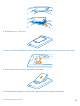
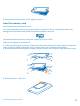
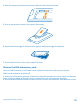
Table Of Contents
- Contents
- Safety
- Get started
- Basics
- People & messaging
- Camera
- Maps & navigation
- Internet
- Entertainment
- Office
- Phone management & connectivity
- Help and support
- Product and safety information

3. If the battery is in, lift it out.
4. Push the SIM into the SIM slot until it is fully inserted. Make sure the contact area is face-down.
5. Line up the battery contacts, and replace the battery.
6. Press the bottom edge of the back cover against the bottom edge of the phone.
© 2013 Nokia. All rights reserved.
8