User Manual
Manuals
Brands
Microsoft Manuals
Cell Phones
GSM/WCDMA cellular phone w/BT and WLAN
11
12
13
14
15
16
17
18
19
20
Table Of Contents
Contents
Safety
Get started
Keys and parts
Back, start, and search key
Antenna locations
Insert the SIM card
Insert the memory card
Remove the SIM and memory card
Charge your phone
Charge your phone with a USB charger
Battery
First start-up
Switch the phone on
Microsoft account
Create your Microsoft account
Copy contacts
Lock the keys and screen
Connect the headset
Change the volume
Icons on your phone
Basics
Get to know your phone
Switch between views
Use the touch screen
Use your phone in airplane mode
Control your phone with your voice
Personalize your phone
Personalize the start screen
Create a safe, fun start screen for kids
Change your theme
Personalize the lock screen
Personalize your phone tones
Silence your phone
Take a screenshot
Extend battery life
Save on data roaming costs
Write text
Use keyboard word suggestions
Add writing languages
Scan codes or text
Clock
Set an alarm
Snooze an alarm
Update the time and date automatically
SkyDrive
Save your photos and other stuff to SkyDrive
Share your photos and documents between your devices
Nokia account
People & messaging
Calls
Call a contact
Use your voice to make a call
Call the last dialed number
Make a conference call
Call your voice mailbox
Contacts
Add a new contact
Save a number from a received call
Save a number from a received message
Search for a contact
Link contacts
Copy contacts from a SIM card
Share your plans with your family and friends
Create, edit, or delete a contact group
Social networks
Set up an account
See your friends' status updates
Post your status
Write on your friend's wall
Comment on a friend's status update
Change your profile photo
Share photos in social networking services
Messages
Send a message
Read a message
Reply to a message
Send a message to a group
Send location in a message
Send an audio message
Use your voice to write a message
Chat with your friends
Mail
Add a mailbox
Exchange ActiveSync
Open mail from the start screen
Send mail
Read mail
Reply to mail
Delete mail
View mails separately
Use your voice to write a mail
Link several mailboxes as a unified inbox
Unlink unified inboxes
Delete a mailbox
Camera
Take a photo
Use different scene modes
Take a close-up photo
Take a photo of a moving object
Take a photo in the dark
Download Nokia Lenses from Store
Record a video
Camera tips
Save your photos and videos to a memory card
Save location info to your photos and videos
Share your photos and videos
Manage and edit your shots
Photos hub
View photos
Mark a photo as a favorite
Upload photos and videos to the web
Change the background in the Photos hub
Create an album
Copy your photos to your computer
Edit a photo
Maps & navigation
Switch location services on
Download HERE Drive from Store
HERE Maps
See where you are on a map
Find a location
Discover nearby places
Find your way inside a shopping center
Get directions to a place
Add a photo to a place
Save a place
Sync your saved places
Download maps to your phone
Change the look of the map
Positioning methods
Internet
Define internet connections
Connect your computer to the web
Web browser
Browse the web
Open a new tab
Add a website to your favorites
Clear the browser history
Search the web
Close all internet connections
Entertainment
Watch and listen
Play music, podcasts, and videos
Nokia Music
Mix Radio
Personalize your Mix Radio
Get recommendations with Mix Radio
Download music from Nokia Music
Find gigs
Sync music and videos between your phone and computer
Store
Browse or search Store
Download an app, game, or other item
View your ongoing downloads
Write a review for an app
Games
Download games
Play a game
Office
Microsoft Office Mobile
Read Microsoft Office documents
Create a Word document
Edit a Word document
Create an Excel workbook
Edit an Excel workbook
Delete a document
View and edit a PowerPoint presentation
Watch a PowerPoint broadcast
Share documents with SharePoint Workspace Mobile
Write a note
Continue with a document on another device
Calendar
Add a task to your to-do list
Add an appointment
View your schedule
Use multiple calendars
Make a calculation
Use your work phone
Tips for business users
Work with mail and calendar on your phone and PC
Keep your data secure on your phone
Be productive with Office apps
Connect to the web
Use Skype to make calls or send messages
Collaborate efficiently with Lync on your phone
Phone management & connectivity
Keep your phone up to date
Update your phone software
Wi-Fi
Wi-Fi connections
Connect to a Wi-Fi
Bluetooth
Connect to a wireless headset
Send your content using Bluetooth
Memory and storage
Back up and restore data on your phone
Check and increase available memory on your phone
Delete an app from your phone
Copy content between your phone and computer
Security
Set your phone to lock automatically
Use your phone when it's locked
Change your PIN code
Find your lost phone
Access codes
Help and support
Product and safety information
Network services and costs
Make an emergency call
Take care of your device
Battery and charger info
Battery safety
Additional safety information
Small children
Medical devices
Implanted medical devices
Accessibility solutions
Hearing
Nickel
Protect your device from harmful content
Operating environment
Information on health
Vehicles
Safety and texting while driving
Potentially explosive environments
Certification information (SAR)
Nokia support messages
Copyrights and other notices
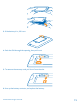
3.
If the battery
is in, lift it out.
4.
Push the SIM through the opening, then pull it out.
5.
To remove the m
emory card, pull
it out from the slot
.
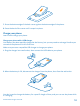
6.
Line up the battery cont
acts, and r
eplace the battery.
© 2013 Nokia. All rights reserved.
11
1
...
...
9
10
11
12
13
...
...
105