
User Manual


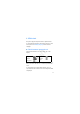

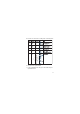

Table Of Contents
- RM-687 User Guide
- 1. Get started
- 2. Your device
- 3. Call functions
- 4. Write text
- 5. Voice commands
- 6. Menu functions
- 7. Accessories
- 8. Battery and charger information

28
■ Pinyin input method
The pinyin symbols are printed on the number keys. You
only need to press a key once, regardless of the position of
the symbol on the number key. The phone makes logical
combinations of the pinyin symbols.
To input a character using the pinyin input method:
1. Press the number key once for each pinyin symbol you
want to input (use "v" for "u").
2. Press 1 repeatedly until you get the desired tone mark.
3. If necessary, press * repeatedly to highlight the desired
pinyin combination.
4. Scroll to the desired Chinese character, and select OK.
■ Stroke input method
The strokes constituting Chinese characters have been
divided into five categories: horizontal, vertical, left-
falling, dot, and turning. Each category corresponds to a
number key from 1 to 5, respectively.
Draft