
User Manual


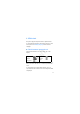

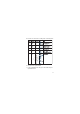

Table Of Contents
- RM-687 User Guide
- 1. Get started
- 2. Your device
- 3. Call functions
- 4. Write text
- 5. Voice commands
- 6. Menu functions
- 7. Accessories
- 8. Battery and charger information

27
4. Write text
This phone supports simplified Chinese input methods.
To switch writing language, when writing text, press and
hold #, and select Writing language and the desired
language.
■ Switch between input methods
Input method indicators are shown at the top of the
display:
Not all the methods may be available in all circumstances.
Always check the indicator to see which input method is
in use.
To switch between available input methods, press #
repeatedly until the indicator of the desired input method
is displayed.
Pinyin Lower case
Stroke Number
input
Uppercase
Draft