
User Manual


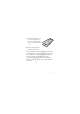

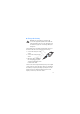
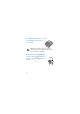

Table Of Contents
- RM-687 User Guide
- 1. Get started
- 2. Your device
- 3. Call functions
- 4. Write text
- 5. Voice commands
- 6. Menu functions
- 7. Accessories
- 8. Battery and charger information

14
Insert the microSD card
1. Remove the back cover.
2. Ensure that the contact area
on the microSD card is facing
downwards, and insert the
microSD card into the card
slot.
3. Replace the back cover.
Remove the microSD card
Important: Do not remove the memory card in
the middle of an operation when the card is being
accessed. Removing the card in the middle of an
operation may damage the memory card as well
as the device, and data stored on the card may be
corrupted.
1. Remove the back cover.
2. Remove the memory card from the slot.
3. Replace the back cover.
Draft