
User Manual





international access code may not
work in all regions. In this case, enter
the international access code directly.
2 To make the call, select
.
3 To end the call, select
.
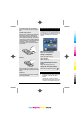
Save phone numbers and mail
addresses
You can save your friends' phone
numbers, mail addresses, and other
information to your contacts list.
Select Menu > Contacts.
Add a contact to the contacts list
1 Select Options > New contact.
2 Select a field, and enter the details. To
close the text input, select
.
Edit contact information
1 Select a contact.
2 Open the contact card tab
.
3 Select a contact detail.
Add details about a contact
Select a contact and Options > Edit >
Options > Add detail.
Send a message
With text and multimedia messages, you
can quickly contact your friends and
family. In a multimedia message, you can
attach pictures, videos, and sound clips
that you want to share.
Select Menu > Messaging.
1 Select New message.
2 To select recipients from the contacts
list, select the To title. To enter the
recipient’s phone number manually,
enter the number in the To field.
3 To add an attachment, select
.
4 Select
.
Sending a message with an attachment
may be more expensive than sending a
normal text message. For more
information, contact your service
provider.
If the item you inserted in a multimedia
message is too large for the network, the
device may automatically reduce the size.
Only compatible devices can receive and
display multimedia messages. Messages
may look different in different devices.
Personalisation
Personalise your tones
You can personalise the ringing, key, and
warning tones for each profile.
1 In the home screen, select the profile.
2 Select Edit active profile.
3 Select Ringing tone or Key tones.
Tip: Download ringing tones from Ovi
Store. For details, go to www.ovi.com.
Change your theme
With themes, you can change the
colours and look of your display.
Select Menu > Settings > Themes.
Select General and a theme.
Some themes include background
animation effects. To save battery power,
select General > Options > Theme
effects.
www.nokia.com/support 13
Cyan
Cyan
Magenta
Magenta
Yellow
Yellow
Black
Black