
User Manual

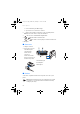




Your phone
25
1. Shows the name of the network or
the operator logo to indicate in
which cellular network the phone is
currently being used.
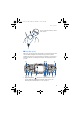
2.Shows the signal strength of the
cellular network at your current
location. The higher the bar, the
stronger the signal.
3.Shows the battery charge level. The
higher the bar, the more power in the
battery
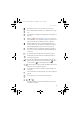
4. The left selection key in standby mode is Go to.
Press Go to to view the list of available functions that you can add to
your personal shortcut list. Press Options and select
• Select options to view the list of available functions that you can
add.
Scroll to the desired function and press Mark to add it to the
shortcut list. To remove a function from the list, press Unmark.
• Organise to rearrange the functions within the list. Select the
desired function and press Move, then select where you want to
move the function.
If for some reason you have deleted the content of the Go to
menu, press Add to add a function.
5. The middle selection key in standby mode is Menu.
6. The right selection key in standby mode is Names, an operator-
specific key or a shortcut to a function that you have selected. If you
press the right selection key when the text is
• Names, you can access the Contacts menu.
• the operator-specific key, you can access an operator-specific
web site.
• a specific function that you have selected and activated in Right
selection key, you can access it directly. See Personal shortcuts on
page 84.
rm-2_en1_FCC.fm Page 25 Monday, February 16, 2004 8:14 AM