
User Manual





Getting started
20
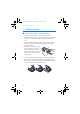
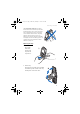
3. Turn the phone to a horizontal position and hold it as shown in
picture (3). The loudspeaker function automatically activates when
the flip is open.
Switching the keyboard lights on or off
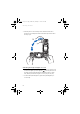
• The keyboard lights are not lit automatically, when you open the flip.
To turn on the lights, press the light key on the top left corner of
the keyboard. The keyboard lights are switched off after a certain
time, but they are turned on again as soon as you press any key.
• To switch the keyboard lights off, press the keyboard light key or
close the flip.
rm-2_en1_FCC.fm Page 20 Monday, February 16, 2004 8:14 AM