
User Manual
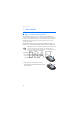

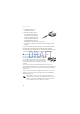

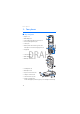

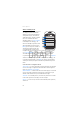
Table Of Contents
- Contents
- For your safety
- General information
- 1. Get started
- 2. Your phone
- 3. Call functions
- 4. Phone menus
- 5. Messaging
- 6. Contacts
- 7. Call log
- 8. Settings
- 9. Operator menu
- 10. Gallery
- 11. Media
- 12. Push to talk
- 13. Organizer
- 14. Applications
- 15. Web
- 16. SIM services
- 17. Computer connectivity
- 18. Enhancements
- 19. Battery information
- Index

Your phone
18
DRAFT
2. Your phone
■ Keys and parts
• Earpiece (1)
• Main display (2)
• Left, middle, and right selection keys (3)
• Four-way navigation key (4)
• Call key (5)
• End key ends calls (short key press) and
turns phone on and off (long key press) (6)
•Keypad (7)
• Camera lens (8)
• Mini display (9)
• Memory card holder (10)
• Loudspeaker (11)
• Microphone (12)
• Pop-Port connector
TM
(13)
• Charger connector (14)
• Camera release key (15)
• Volume is activated by
volume down/up key (short key press), voice dialing is activated by