
User Manual



Media
66
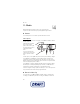
Loudspeaker or Headset—to listen to the radio using the loudspeaker or headset.
Keep the headset connected to the phone. The lead of the headset functions as
the radio antenna.
Set frequency—to enter the frequency of the desired radio station
You can normally make a call or answer an incoming call while listening to the
radio. During the call, the volume of the radio is muted.
When an application using a packet data or HSCSD connection is sending or
receiving data, it may interfere with the radio.
■ Voice recorder
You can record pieces of speech, sound, or an active call, and save them in
Gallery. This is useful when recording a name and phone number to write down
later.
The recorder cannot be used when a data call or GPRS connection is active.
Record sound
1. Select Menu > Media > Voice recorder.
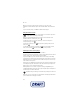
To use the graphical keys , , or on the display, scroll left or right to
the desired key, and select it.
2. To start the recording, select . To start the recording during a call, select
Options > Record. While recording a call, all parties to the call hear a faint
beeping sound. When recording a call, hold the phone in the normal position
near to your ear. To pause the recording, select .
3. To end the recording, select . The recording is saved in Gallery >
Recordings.
To listen to the latest recording, select Options > Play last recorded.
To send the last recording, select Options > Send last recorded.
To see the list of recordings in Gallery, select Options > Recordings list >
Recordings.
■ Equaliser
To control the sound quality, use the music player to amplify or diminish
frequency bands.
Select Menu > Media > Equaliser.
To activate a set, scroll to one of the equaliser sets, and select Activate.