
User Manual



Media
65
Music downloads—to connect to a browser service related to the current track.
This function is only available when the address of the service is included in the
track.
■ Radio
The FM radio depends on an antenna other than the wireless device antenna. A
compatible headset or enhancement needs to be attached to the device for the
FM radio to function properly.
Warning: Listen to music at a moderate level. Continuous exposure to
high volume may damage your hearing. Do not hold the device near
your ear when the loudspeaker is in use, because the volume may be
extremely loud.
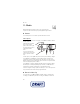
Select Menu > Media > Radio.
To use the graphical keys , , , or on the display, scroll left or right
to the desired key, and select it.
Save radio frequencies
1. To start the search, select and hold or . To change the radio frequency
in 0.05 MHz steps, briefly press or .
2. To save a frequency to a memory location, 1 to 9, press and hold the
corresponding number key. To save a frequency to a memory location from 10
to 20, press briefly 1 or 2, and press and hold the desired number key, 0 to 9.
3. Enter the name of the radio station.
Listen to the radio
Select Menu > Media > Radio. To scroll to the desired frequency, select or
, or press the headset key. To select a radio station, briefly press the
corresponding number keys. To adjust the volume, press the volume keys.
Select from the following options:
Switch off—to turn off the radio
Save station—to save a new radio station
Stations—to select the list of saved stations. To delete or rename a station, scroll
to the desired station, and select Options > Delete station or Rename.
Mono output or Stereo output—to listen to the radio in monophonic sound or in
stereo