
User Manual





Your phone
18
■ Open and close the phone
To open the phone, push the slide up using the tab located just
above the 4-way scroll key.
To close the phone, push the tab down to the closed position.
To answer calls by opening the slide and end calls by closing the
slide, see Slide call handling in
Call p. 56.
■ Standby mode
When the phone is ready for use, and you have not entered any
characters, the phone is in the standby mode
.
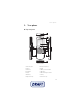
Display
1 Signal strength of the cellular network
2 Battery charge status
3 Indicators
4 Name of the network or the operator logo
5 Clock
6 Main screen
7 Function of the left selection key is Go to or a
shortcut to another function. See
Left selection
key
p. 51.
8 Function of the middle selection key is Menu
9 Function of the right selection key is Names or a
shortcut to another function. See
Right selection key p. 51.
Operator variants may have an operator-specific name to access an
operator-specific website.
Active standby
In the active standby mode there is a list of selected phone features and
information on the screen that you can directly access in the standby mode. To
switch on the mode, select Menu > Settings > Main displayDisplay > Standby
mode settings >Active standby > My active standby. In the standby mode, scroll
up or down to activate navigation in the list. To start the feature, select Select; or