
User Manual





Get started
15
Digital rights management (DRM) protected content comes with an associated
activation key that defines your rights to use the content. If your device has OMA
DRM protected content, to back up the content, use the backup feature of Nokia
PC Suite. If your device has WMDRM protected content, both the activation keys
and the content will be lost if the device memory is formatted. You may also lose
the activation keys and the content in case the files on your device get corrupted.
Losing the activation keys or the content may limit your ability to use the same
content on your device again. For more information, contact your service
provider.
■ Connect a headset
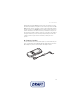
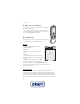
To connect an HS-47 stereo headset, an HS-40, HS-60, or HS-81 headset to your
device, you must use the microUSB-Nokia AV audio adapter AD-55. Connect the
AD-55 adaptor to your device and a headset to the adaptor as shown.